
Florist POS · USA · UAE · Pakistan
GetFloristPOS books deliveries into time slots, keeps wire orders in their own queue, prices custom arrangements from their stems, dates every bunch in the cooler and holds event deposits until the balance is due. Add your products and your online store builds itself.
14-day free trialNo contractNo per-order commission



Saturday · 10:00–12:00
Hand-tied, coral & cream · 18 stems
- Card
- “Happy 40th, Mum. Love, Sam & Leo”
- Zone
- Riverside · Van 2
- Recipe
- 6 ranunculus · 5 roses · 4 eucalyptus · 3 craspedia
What it does
A general POS rings up a sale. A flower shop sells promises: a time, an address, a card message, a design that doesn’t exist yet. These five are built in, on every plan where they belong.
See every feature
Delivery date and time slots
Book “Saturday, 10–12” at the counter, on the phone or online. Each slot has a capacity, closes when full, and the van sheet prints in route order.
How it works
Wire orders in their own queue
Incoming and outgoing relay-network orders sit apart from retail, with what each one really earns. Networks connect by integration.
How it works
Custom arrangements from a recipe
Price a centrepiece from the stems, sundries and labour in it. Sell it, and every stem leaves stock.
How it works
Perishables stock with dates
Received dates, lots and vase life on every bunch. Waste is logged as waste, so you buy less of what dies in the bucket.
How it works
Event orders with deposits
Weddings, mehndis and launches booked months ahead: deposit taken, balance-due date set, reminders sent.
How it works
Delivery scheduling
Every delivery lands in a date and a time window with a capacity you set. When the 10–12 run is full, it stops being offered at the counter, on the phone and online. Turn the board, then pick a slot to see its van sheet.
Example day: Saturday before Mother’s Day
Van sheet · 9–12
7 of 9 deliveries booked · slot closes itself when full
- NorthHaddad — Hand-tied, 18 stems
- NorthOkafor — Vase, peonies
- RiversideLee — Sympathy spray
- RiversideRuiz — Dozen roses
- Old TownPatel — Hatbox, coral
- Old TownNovak — Orchid plant
- HillsideKhan — Wire order (incoming)
Van sheet · 12–3
5 of 8 deliveries booked · slot closes itself when full
- NorthBrown — Garden vase
- RiversideAli — Centrepiece
- RiversideTanaka — Anniversary roses
- Old TownMensah — Birthday hand-tied
- HillsideGarcia — Corporate weekly
Van sheet · 3–6
9 of 9 deliveries booked · slot closes itself when full
- NorthSilva — Mother’s Day box
- NorthCohen — Mother’s Day box
- RiversideHussain — Hand-tied + card
- RiversideDubois — Wire order (incoming)
- Old TownYilmaz — Lilies, no pollen
- Old TownEvans — Plant + balloon
- HillsideMoreau — Vase, ranunculus
- HillsideAbara — Dozen roses
- Old TownNg — Get-well basket
Example data, for illustration. How delivery slots, zones and fees work.
Wire orders
Wire orders get their own queue, and their own numbers.
Incoming orders from other shops and outgoing orders you send never mix with walk-ins. You see what a wire order really earns after fees, before you accept it.
| Direction | For | Deliver | Status |
|---|---|---|---|
| Incoming | Sympathy spray | Fri 2–5 | Accepted |
| Incoming | Dozen roses | Sat 10–12 | Needs review |
| Outgoing | Birthday vase, out of area | Sat | Sent |
Event orders
Deposits you can’t lose track of.
- BookedDeposit paid30%
- 8 weeks outDesign confirmedchange order +2 centrepieces
- 14 days outBalance duereminder sent
- Event dayInstall + pickupvan sheet

Online store, included
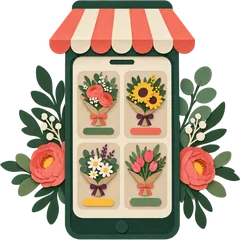
Every arrangement you add, with its photo, sizes, price and stock, appears in an online store generated from your catalogue. Customers pick delivery or pickup and a time slot at checkout, and the order lands in the same book as the counter.
- Sizes as variations: standard, deluxe, premium
- Sold-out stems hide the arrangement automatically
- Card message and delivery instructions at checkout
How it works
Times are honest estimates for a single shop with about 100 products in a spreadsheet. Photographing every arrangement takes longer, and our onboarding team will do the import with you.

Sign up
Create your account online. No install, no card for the trial.
- Step
- 1 of 4
- Time
- 3 min
- You need
- An email or phone

Add your shop
Location, delivery zones and fees, time slots and their capacity, receipt language and currency.
- Step
- 2 of 4
- Time
- 10 min
- You need
- Your delivery area

Add products
Import a spreadsheet or add arrangements by hand: sizes, prices, photos, stems in each recipe.
- Step
- 3 of 4
- Time
- ~30 min
- You need
- A product list (CSV)

Your store goes live
The online store builds itself from your catalogue, with delivery slots at checkout. Start selling.
- Step
- 4 of 4
- Time
- 1 min
- You need
- Nothing else
Pricing per shop location
What florists tell us
Sample These are illustrative sample reviews, written to show the kind of feedback we design for. Real reviews replace them once shops are live.
“The week before Valentine's we stopped promising 'sometime Saturday'. Each slot fills up, closes itself, and the van sheet for the 10 to 12 run prints in street order.”
“Half our orders still arrive on WhatsApp. Now they go straight into the order book with the slot and the card message, and the invoice shows VAT the way our accountant wants.”
“Shaadi season used to be a notebook of advances. Each mehndi and barat booking now shows what was paid, what's due, and when. Customers get an Urdu receipt.”
“My designers work in Spanish, the screens are in Spanish, and the recipe for the dozen-rose arrangement takes the stems out of stock when we sell it.”
“We log what goes in the bin as waste, not as a mystery. After a month we bought fewer of the stems that never sold past day four.”
“Roses move from the Clifton shop to DHA when one runs short, and I see all three tills from home. JazzCash and cash sit on the same report.”
Where we sell

USA
USD, sales tax added at checkout. Valentine’s, Mother’s Day, prom, sympathy work. Spanish screens for Spanish-speaking teams.
Florists in the USA
UAE
AED with 5% VAT included. WhatsApp orders, flower boxes, Ramadan and Eid gifting, Arabic receipts. Dubai, Abu Dhabi, Sharjah.
Florists in the UAE
Pakistan
PKR plus applicable sales tax. Wedding season, stage décor, garlands, JazzCash and Easypaisa, Urdu receipts. Karachi, Lahore, Islamabad.
Florists in PakistanLanguages
Screens and receipts run in your shop’s language, right to left where it should be, and you can edit any translation. How languages work.
FAQ
What is a florist POS system?
A florist POS is point-of-sale software built around how a flower shop sells: delivery orders booked into a date and time window, wire orders from other shops, custom arrangements priced from their stems, perishable stock and event deposits. A general retail till handles the counter sale only; a florist POS also runs the order book behind it.
How much does GetFloristPOS cost?
Plans are priced per shop location with no contract and no per-order commission. In the USA, Bud is $39, Bloom $79 and Garden $139 a month; the UAE and Pakistan have their own prices in AED and PKR. Annual billing gives 2 months free. Every plan starts with a 14-day free trial.
Can customers choose a delivery time slot when they order online?
Yes. You define slots per day (for example 9–12, 12–3, 3–6) with a capacity each. Your auto-generated online store shows only slots that still have room, and a slot closes itself when it fills. The same slots appear at the counter and on phone orders, so nobody double-books the van.
Does GetFloristPOS work with FTD, Teleflora or BloomNet?
Wire orders have their own queue in GetFloristPOS, and relay networks connect to it by integration through our API connector. We set up the connection with you on your demo, using your own network membership. We are not affiliated with any wire network, and we do not take a cut of wire orders.
Do I need to install anything?
No. GetFloristPOS is hosted: you sign up online and use it in a browser on a computer, tablet or phone, plus the mobile app. Receipt printers, label printers, cash drawers and barcode scanners plug into the device you sell on. See the hardware guide for what works.
Will my online store really build itself?
Yes. Every product you add (photo, price, sizes, stock) appears in an online store generated from your catalogue, with delivery or pickup and time-slot choice at checkout. If you want a fully designed site on your own domain, the managed website is the done-for-you upgrade.
Which countries and currencies do you support?
We sell in the USA (USD, sales tax added at checkout), the UAE (AED, prices shown with 5% VAT included) and Pakistan (PKR, plus applicable sales tax). The software handles multiple currencies, tax rates and tax groups, and local receipt layouts and date formats.
Can my staff use it in Arabic, Urdu or Spanish?
Yes. The interface and receipts can run in English, Arabic, Urdu, Spanish and many other languages, and you can edit any translation yourself. Arabic and Urdu screens and receipts read right to left.
How do event and wedding deposits work?
Book the event as an order with its date, venue and design notes, take a deposit against it, and set when the balance is due. The order shows paid and outstanding amounts at all times, and reminders go out before the balance date. Change orders update the total.
Can I move from my current POS?
Yes, and moving your products, customers and stock levels is free. Export a CSV from your current system, and our onboarding team maps the columns and imports it with you. Most shops keep their old system running for a week while staff learn the new one.
Start the free trial, add a few arrangements and book a test delivery into Saturday’s 10–12 slot. If you’d rather see it first, we’ll walk you through it on a call.
14-day free trialNo contractNo per-order commission